
Best 20W Laser Cutter: Top Choices, Features, and Buying Tips
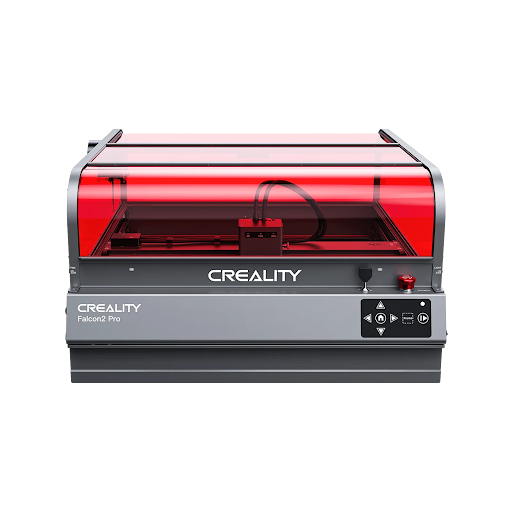
Why Choose a 20W Laser Cutter for Your Workshop
A 20W laser cutter is ideal when you need finer engraving detail and can’t justify the footprint or HVAC demands of a CO₂ system.
- Compared to sub-10w diode units, this power level delivers smoother cuts through materials up to 6mm with fewer passes and crisper edges.
- Wood engravers see deeper contrast, acrylic signage gets polished faces, and leather crafters can cut multiple pieces without charring.
- It’s also lighter on power consumption than higher-output machines, keeping electric bills reasonable for a small business.
For makers who want both affordability and flexibility, a 20W cutter handles personalized gifts, prototypes, and small production runs without overcomplicating the workflow.
Key Features to Evaluate Before Buying
Look beyond wattage to gauge what makes a 20W cutter reliable.
- Cutting area dictates the size of signage or wood panels you can handle in a single pass; ensure it aligns with your typical project scope.
- A stable laser source with quality optics keeps focus tighter across the bed, making intricate engravings sharper.
- Software compatibility matters: choose a system that plays nice with common file types, has an approachable interface, and receives updates without hidden licensing fees.
- Solid build quality and an efficient cooling system reduce downtime—especially during longer jobs.
- Inspect the motion system: belts, rails, and drive electronics influence repeatability and upkeep needs, which matters when running batch jobs or filling Etsy orders.
Performance and Material Capabilities
A 20W laser cutter performs best on:
- Wood,
- Acrylic,
- Leather,
- Coated metals, and
- Thin plastics.
- You can expect clean 2–3mm acrylic cuts in one pass if the beam focus is dialed, while engraving in cherry or maple gives that warm contrast many makers love.
- Leather hides and cork sheets respond predictably when you maintain consistent speed settings.
- Thicker stock like 6mm plywood takes multiple passes, so plan for extra time and use air assist to keep edges clean.
For batch runs, repeatability hinges on a rigid frame and reliable autofocus; recalibrating between jobs should be minimal. Always test new materials at lower speeds first, then ramp up until you find a balance between detail and throughput.
Safety, Maintenance, and What to Expect Over Time
Since 20W lasers can still generate harmful fumes and debris, ensure proper ventilation:
- A built-in exhaust fan with ducting or a compatible air filtration system is essential.
Look for enclosures with safety interlocks that shut down the beam if the lid opens mid-cycle.
Consumables like lenses and mirrors wear with use—check how easy they are to replace and the typical service interval.
Regular maintenance includes:
- Cleaning optics,
- Checking belt tension, and
- Wiping down tracks to preserve machine accuracy.
Warranty terms differ widely; aim for at least a year of coverage with clear instructions on how to access repairs or replacement parts.
Daily users might also budget for an annual tune-up to keep everything running smoothly.
Budget Breakdown and Running Costs
Reliable 20W laser cutters span from around $1,000 to $2,500 in the US.
- Lower-tier models often include the machine and basic software, while higher-end kits throw in air assist hoses, exhaust fans, and pre-installed filters.
Factor in add-ons like:
- A dedicated air compressor,
- Advanced rotary attachments, or
- Upgraded materials packs.
Some brands bundle proprietary software with optional subscriptions or paid updates, so understand what’s included before buying.
Shipping, setup help, or training resources can add another few hundred dollars, especially if the machine ships in multiple components.
Evaluate whether bundled accessories meet your needs or if aftermarket purchases offer more flexibility without breaking the bank.
Comparing the Leading Models
When comparing top contenders, line up key metrics:
- Cutting area,
- Included software,
- Safety features, and
- Extras such as auto-focus or air assist.
Look for models with:
- User-friendly interfaces,
- Strong community support, and
- Clear return policies.
Value-packed machines often include multilingual software and firmware updates that stay compatible with modern OS releases.
Read multiple owner reviews to spot recurring praise or concerns about reliability.
Vet dealers by checking:
- Warranty extensions,
- Return windows, and
- Replacement part availability—especially important if you plan on making heavy use of the machine.
Finally, consider the reputation of the brand’s support team when speed of response could keep your workflow moving.
Creality Falcon Best-Fit Pick
The Creality Falcon 20W laser cutter stands out for delivering consistent 20W output alongside precision optics suited for wood, acrylic, leather, and coated metals.
- Auto-focus capabilities and integrated exhaust reduce the upfront fuss, letting you dive into projects faster.
- Creality’s ecosystem includes ongoing software support, helpful tutorials, and a wide accessory catalog so you can scale from hobby builds to small craft business needs with confidence.
Its blend of performance, price, and user-friendly design makes it a balanced choice for makers seeking a durable, versatile laser cutter.
Consider reaching out to Creality for hands-on guidance or to double-check compatibility with your projects.
Maintenance, Safety, and Cost Considerations by Laser Type
Upkeep depends on laser source and usage.
- CO2 cutters need mirror cleaning, lens swaps, and eventual gas tube replacement, while fiber lasers mostly focus on keeping lenses dust-free and monitoring coolant levels.
- Diode lasers have fewer moving parts but still benefit from clean optics and stable mounts.
Safety practices span all types:
- Wear rated goggles,
- Keep a fire extinguisher nearby, and
- Funnel fumes through proper ventilation or filters.
Energy costs differ too:
- CO2 systems draw steady current for high power,
- Fiber lasers run more efficiently, and
- Diodes sip the least electricity.
Cost buckets to track:
- Equipment and installation,
- Consumables (nozzles, filters, gas),
- Energy use per hour,
- Service and spare parts.
Estimate ROI by projecting weekly runtime, average material costs, and how many saleable parts you expect. A well-matched laser pays back faster, so align your maintenance routine and safety checklist with expected output levels.
